An invisible AI for the
calls that matter. Privately.
Privacy Window is a private companion that runs alongside your online meetings — invisible to the other side, indispensable to yours. Rehearse the meeting. Work through the 1-on-1. Prep the interview.
Windows desktop client • Free during private beta • macOS coming soon
Three modes. One private window.
Pick the kind of conversation you have coming up. The AI plays the other side based on the context you give it.
Meeting
A high-stakes meeting? Describe the subject and your role. The AI plays another participant — challenging, asking, pushing back where a real one would.
1-on-1
A delicate ask. Hard feedback. Describe the topic and your relationship — the AI plays the other person, with their context, history, and pushback.
Interview
Going for a role? Paste the resume and the job spec. The AI plays the candidate — answering, dodging, name-dropping experience. You sharpen your interviewing.
Translation
International call? Set the language pair. Type or speak in either side, the AI translates instantly to the other — invisible to the people you're talking to.
From cold start to ready in three steps.
Set the scene
Pick the type. Paste the resume, the topic, the relationship. Whatever the AI needs to play the other side credibly. The system prompt is built for you.
Talk it through
Type or hit F8 to record — globally, even with your video call in focus. Audio is transcribed instantly. The AI replies in character.
Walk in ready
Close the window. The hard part of the real conversation? You already had it. The window leaves no trace.
Built for online events you can't afford to leak.
Privacy Window opens as its own window — separate from your browser, separate from your meeting client. Whoever is on the other end of your video call sees nothing.
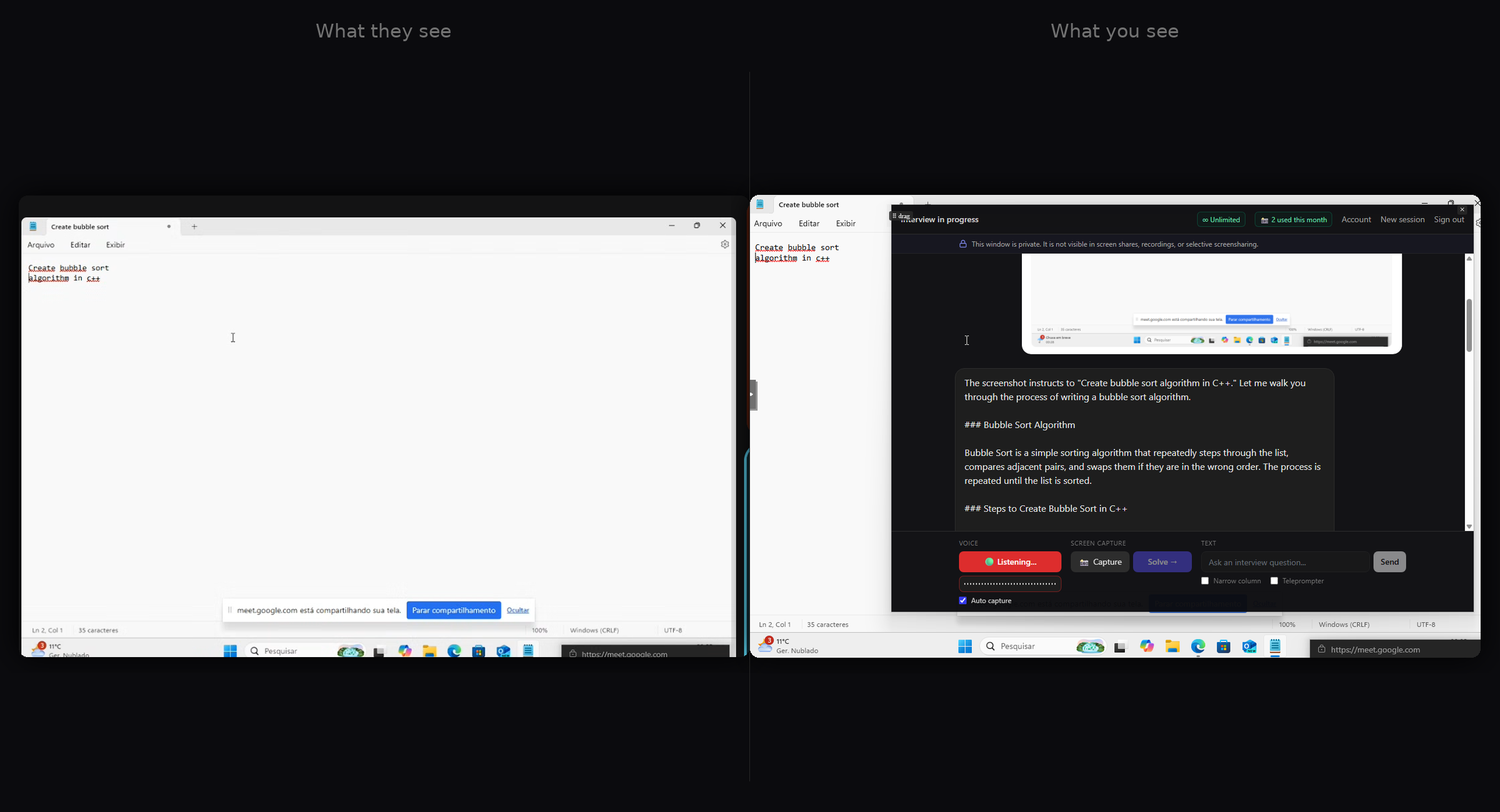
Invisible to others
Runs as a separate window. Not captured by selective screensharing. Stays out of recording overlays.
Voice without breaking eye contact
Press F8 globally — even with your video call in focus. Your audio is transcribed and answered without ever switching windows.
Sessions don't persist
Close the window and the rehearsal is gone. No history saved server-side. Nothing to leak later.
Pricing
Free during private beta. Paid plans coming soon.
- ✓ Four modes (Meeting, 1-on-1, Interview, Translation)
- ✓ Voice: global F8 or auto-capture (sends on each pause)
- ✓ Screen: capture and ask the AI to solve (10/month)
- ✓ Web research on the company for interviews
- ✓ Reading modes: narrow column + teleprompter mirror
- ✓ Private sessions — 10 min/month during beta, no server-side history
- + 4 hours of active sessions per month (24× the trial)
- + 100 screenshots per month (10× the trial)
- + All four modes — meeting, 1-on-1, interview, translation
- + No history kept on our servers — same privacy as the trial
- + Hosted billing via Lemon Squeezy — cancel from your account